Browleri
🚆 Pathfinding algorithm/simulator
A Go-based multi-train routing, visualization & pathfinding engine
This project is a pathfinding and simulation tool for routing multiple trains through a railway network. It supports BFS, DFS, Dijkstra, and A* algorithms, detects station capacity conflicts, and can generate PNG visualizations of the railway graph.
First go to gitea repository. You will find the link from kood/sisu site. Then either open with vscode or type git clone https://gitea.kood.tech/pyryvainikainen/pathfinder to your terminal.
NOTE: Repository is private and it can only be shared with potential employers.
▶️ Running the Program
Basic usage
go run . [MAP_FILE] [START_STATION] [END_STATION] [NUM_TRAINS]
If using the included maps, you will need to use directory name map/ in front of map file. Example of this format below.
Example:
go run . map/network.map waterloo st_pancras 4
T1-victoria T2-euston
T1-st_pancras T2-st_pancras T3-victoria T4-euston
T3-st_pancras T4-st_pancras
Optional flags:
| Flag | Description |
| — | — |
| -h or --help | Print Help |
| -r or --render | Runs the pathfinder and renders a validated map to output.png |
| -ro or --renderonly [MAP_FILE] | Renders an unvalidated map to output.png, ingores all arguments except [MAP_FILE]. |
| -v or -verbose | Prints out turns taken and time to calculate |
| -e=[PV or MK] or -engine=[PV or MK] | Changes the pathfinding engine that the program uses. Default option is PV but MK has further algorithm optionality.
| ` -engine=MK-[algorithm]` | MK engine supports the following algorithms: Depth-First Search (dfs), Breadth-First Search (bfs), Dijkstra (dijkstra) and A* (a*). The optionality can be triggered with extra specifier, for example -engine=MK-dijkstra
Note! Options must be entered before any arguments.
Note! Rendering will output to output.png in the base directory. Existing file will be overwritten.
Example: Run pathfinder for map/london.map from station ‘waterloo’ to station ‘st_pancras’ for 4 trains:
go run . map/london.map waterloo st_pancras 4
Example: Run pathfinder and render the map map/beethoven.map from station ‘beethoven’ to station ‘part’ for 9 trains:
go run . -render map/beethoven.map beethoven part 9
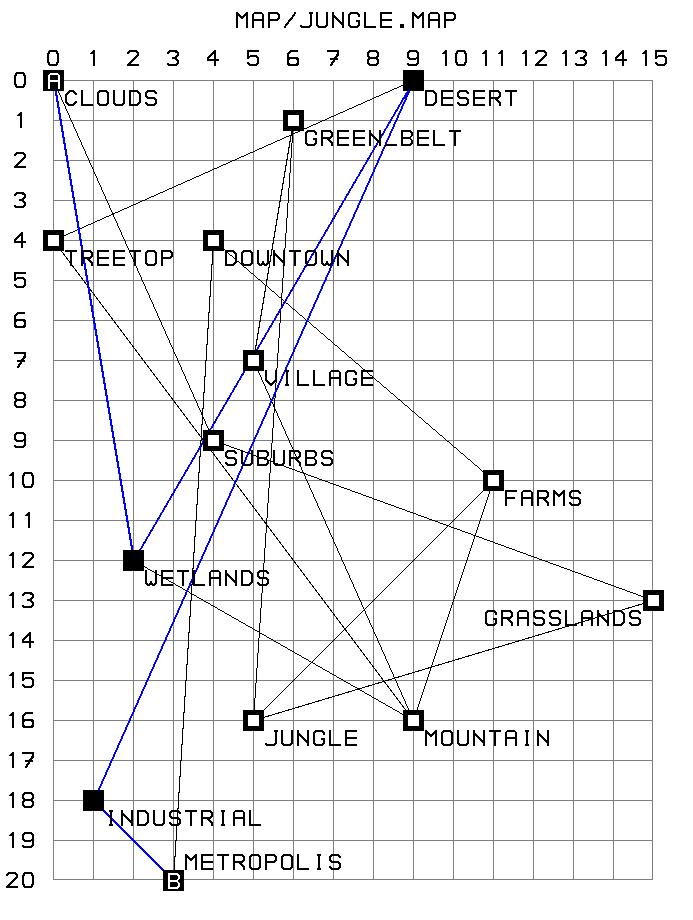
Example: only render the map map/jungle.map to:
go run . -renderonly map/jungle.map
Example: Run pathfinder from station ‘125’ to ‘9875’ using the Dijkstra algorithm and finding out the execution time, you could use the following parameters:
go run . -engine=MK-dijkstra -verbose map/100x100_grid.map 125 9875 10
Pathfinding Engines
PV, the default option. BFS-based preprocessing for static maps. Fast and scalable due to minimal on-the-fly processing.MK, the more dynamic on-the-fly engine with various options.
Automated testing & coverage
Following automated tests cover both pathfinding engines and are supplied in app/app_test.go:
- It can find more than one route for 2 trains between waterloo and st_pancras for the London Network Map
- It finds more than one valid route for 3 trains between waterloo and st_pancras in the London Network Map
- It finds more than one valid route for 4 trains between waterloo and st_pancras in the London Network Map
- It finds more than one valid route for 100 trains between waterloo and st_pancras in the London Network Map
- It finds only a single valid route for 1 train between waterloo and st_pancras in the London Network Map
- It completes the movements in no more than 6 turns for 4 trains between bond_square and space_port
- It completes the movements in no more than 8 turns for 10 trains between jungle and desert
- It completes the movements in no more than 11 turns for 20 trains between beginning and terminus
- It completes the movements in no more than 6 turns for 4 trains between two and four
- It completes the movements in no more than 6 turns for 9 trains between beethoven and part
- It completes the movements in no more than 8 turns for 9 trains between small and large
All automated tests can be run with 'go test ./...' which reports if a package has automated tests and whether they succeed or fail.
Lessons learnt
While working on the project, we’ve had to solve many problems that we have not encountered before and we have become more comfortable with different topics. To name a few:
- Implementing pathfinding algorithms
- Measuring execution time in Go
- Usage of flags-package, instead of using os.Args to parse them
- Testing in Go
- Image generation, working with spritemaps
- Generating shapes in images